How to Attach a Product to a Page (Order Forms)
💳 Attaching a Product to Your Site Page
📌 Step 1: Understand the Requirement
To use order forms, you must:
1️⃣ Create a product in your HighLevel Sub-Account
2️⃣ Attach that product to the page where users will:
Checkout
Purchase
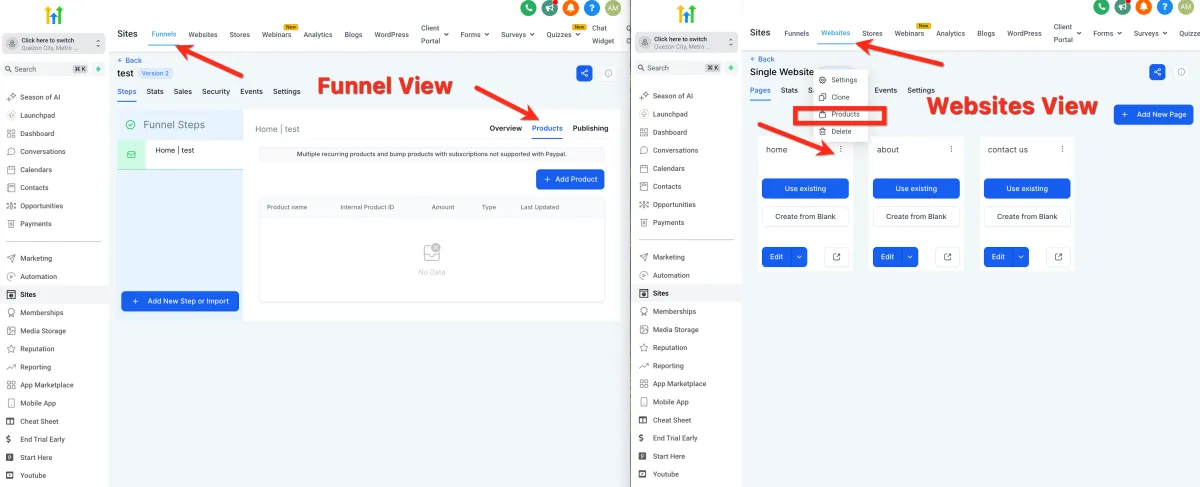
🌐 Step 2: Access Products (Websites)
1️⃣ Go to your Website Pages.
2️⃣ Click the ⋮ three dots on the top right of the page.
3️⃣ Select Products.
🔄 Step 3: Access Products (Funnels)
1️⃣ Open your Funnel.
2️⃣ Select the specific funnel step.
3️⃣ Click the Products tab at the top right.
➕ Step 4: Add a Product
1️⃣ In the Products tab, click to add a product.
2️⃣ Select an existing product from your account.
🛠️ Step 5: Create a Product (If Needed)
1️⃣ If no product exists:
Create a new product in your Sub-Account
2️⃣ Return to the page and attach it.