How to Edit Page Name and URL Path (Publishing Settings)
🚀 Publishing / Page Settings
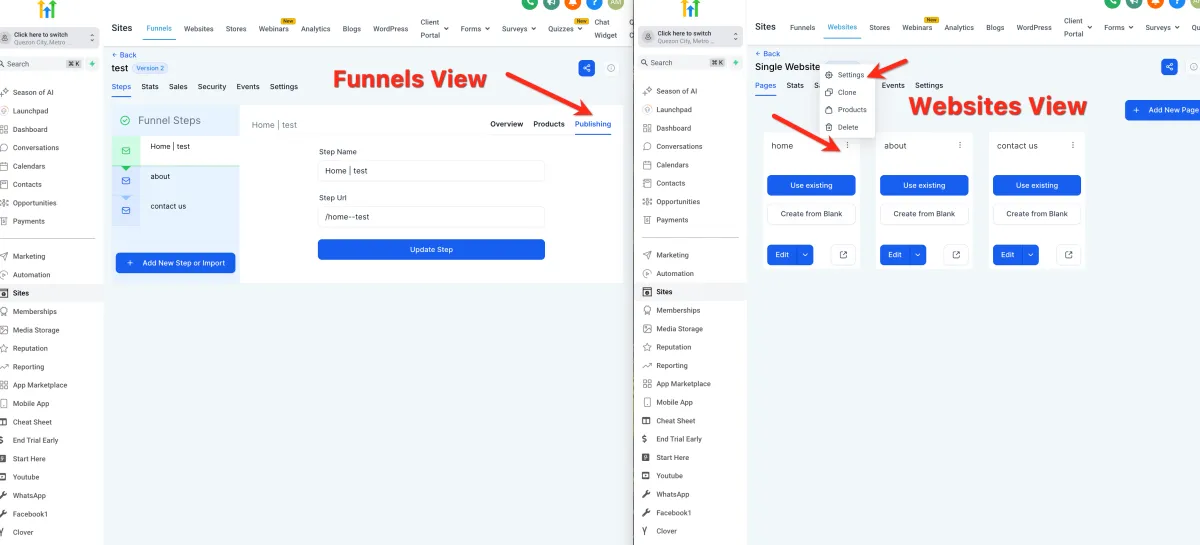
📌 Step 1: Access Page Settings
For Websites:
1️⃣ Open your page in the Site Builder.
2️⃣ Click the ⋮ three dots on the top right.
3️⃣ Select Settings.
For Funnels:
1️⃣ Open your Funnel.
2️⃣ Select the funnel step you want to edit.
3️⃣ Click the Publishing tab.
✏️ Step 2: Edit Page Name
1️⃣ Update the page/step name.
💡 This helps you organize your pages internally.
🔗 Step 3: Edit URL Path
1️⃣ Enter your desired path (URL extension).
Example:
yourdomain.com/about → /about is the path
2️⃣ Save your changes.
⚠️ Important Notes
Each page must have a unique path
If the path already exists:
The system will automatically add numbers
If no path is set:
A random one will be generated