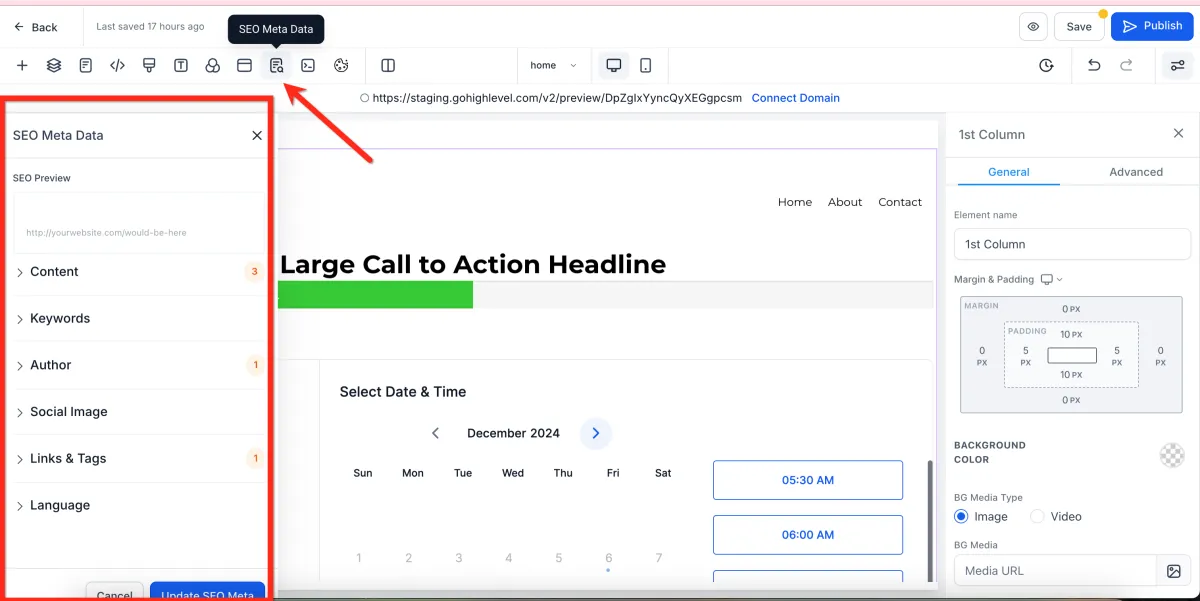
How to Edit SEO Meta Data
🔍 SEO Meta Data
📌 Step 1: Open SEO Settings
1️⃣ Open your page in the Page Builder Editor.
2️⃣ Navigate to the SEO Meta Data section.
✏️ Step 2: Enter SEO Information
1️⃣ Fill in the required fields such as:
Page Title
Meta Description
Other SEO-related details
🌐 Step 3: Understand Where It Appears
Your SEO metadata will be visible in:
Search engine results (Google, etc.)
Browser tabs (page title)
Shared links (preview title and description)
⚠️ Important Notes
SEO settings may seem small but are very important
Proper setup helps:
Search engines find your site
Improve visibility
Build trust when links are shared