What Are Documents & Contracts
The Documents & Contracts section allows you to create, manage, and track contracts, agreements, and other documents within LeadBossCRM.
From this section, you can view document templates, track document status, and manage signed agreements.
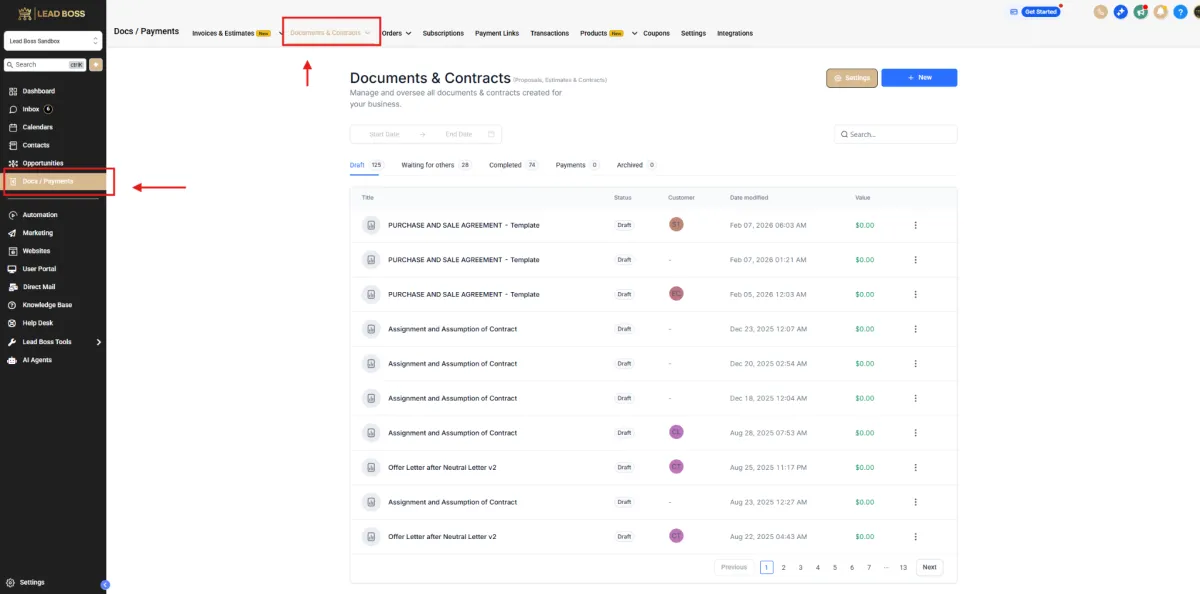
📌 Step 1: Navigate to Docs / Payments
1️⃣ Login to LeadBossCRM.
2️⃣ From the left sidebar menu, click Docs / Payments.
This section contains tools related to invoices, subscriptions, payments, and documents.
📄 Step 2: Open Documents & Contracts
1️⃣ At the top navigation menu, click Documents & Contracts.
2️⃣ You will now be taken to the Documents & Contracts dashboard.
📊 Expected Result
You will now see the Documents dashboard, where you can:
Create new documents
View document templates
Track document activity
Manage sent or completed contracts
Overview of the Documents Dashboard
The Documents Dashboard is where you can manage all documents and contracts within LeadBossCRM.
From this dashboard, you can create new documents, edit templates, track document status, and manage signed agreements.
Common features available in the Documents dashboard include:
🔹 Create Document
Create a new document or contract template.
🔹 Templates
Manage reusable document templates.
🔹 Document Activity
Track documents that have been sent, signed, or are awaiting signature.
🔹 Search and Filters
Quickly find specific documents.
The dashboard helps you keep all contracts and agreements organized in one place.
Document Status Explained (Draft, Sent, Completed)
Each document inside LeadBossCRM has a status that indicates its progress.
Understanding these statuses helps you track documents more effectively.
📄 Draft
A Draft document is a document that has been created but has not yet been sent to a contact.
Drafts can still be edited before sending.
📤 Sent
A document with the Sent status has been delivered to a recipient but has not yet been signed.
The recipient can open the document and complete the required fields or signatures.
✅ Completed
A document with the Completed status means that all required signatures and fields have been completed.
Once completed, the signed document is saved in the system for future reference.
💡 Tip
You can track document progress from the Documents dashboard to see which contracts are still waiting for signatures.